How to see all your email accounts in one place
To see all your email accounts in one place, add them all to one email app that has a combined ("unified") inbox. On a computer that can be New Outlook, Thunderbird, or a free app such as Zackem; on a phone, most mail apps can do it. The old trick of pulling everything into Gmail no longer works the way it used to: in 2026 Google removed Gmailify and the "check mail from other accounts" (POP) option from Gmail.
What changed in Gmail
For years many people made Gmail their one inbox by letting it fetch mail from Yahoo, Outlook.com or a work address. Google's help page "Gmail will start removing support for the following features" explains that Gmailify and POP fetching from other accounts are being removed. If your other accounts suddenly stopped showing up in Gmail, that is why. Forwarding from the other account to Gmail still works, but replies then come from your Gmail address unless you set up "Send mail as".
Method 1: New Outlook for Windows (All Accounts)
- Open New Outlook and go to Settings → Accounts → Add account for each address.
- Turn on the All Accounts view in the folder list (Microsoft added this combined inbox in late 2026; if you don't see it yet, update Outlook).
Good to know: when you add Gmail, Yahoo or another non-Microsoft account to New Outlook, Microsoft syncs it through its own cloud.
Method 2: Thunderbird (free)
- Install Thunderbird and add each account with Account Settings → Account Actions → Add Mail Account.
- Click the folder-pane menu (three dots) and choose Unified Folders.
Thunderbird is free and keeps your mail on your computer; it takes a little more setup than the others.
Method 3: Zackem (free, unlimited accounts)
- Download Zackem from zackem.ai (Windows or Mac; there are iPhone and Android apps too).
- Click Add account, choose your provider — Google, Microsoft, Yahoo, iCloud, Zoho or any IMAP — and sign in. Repeat for each address.
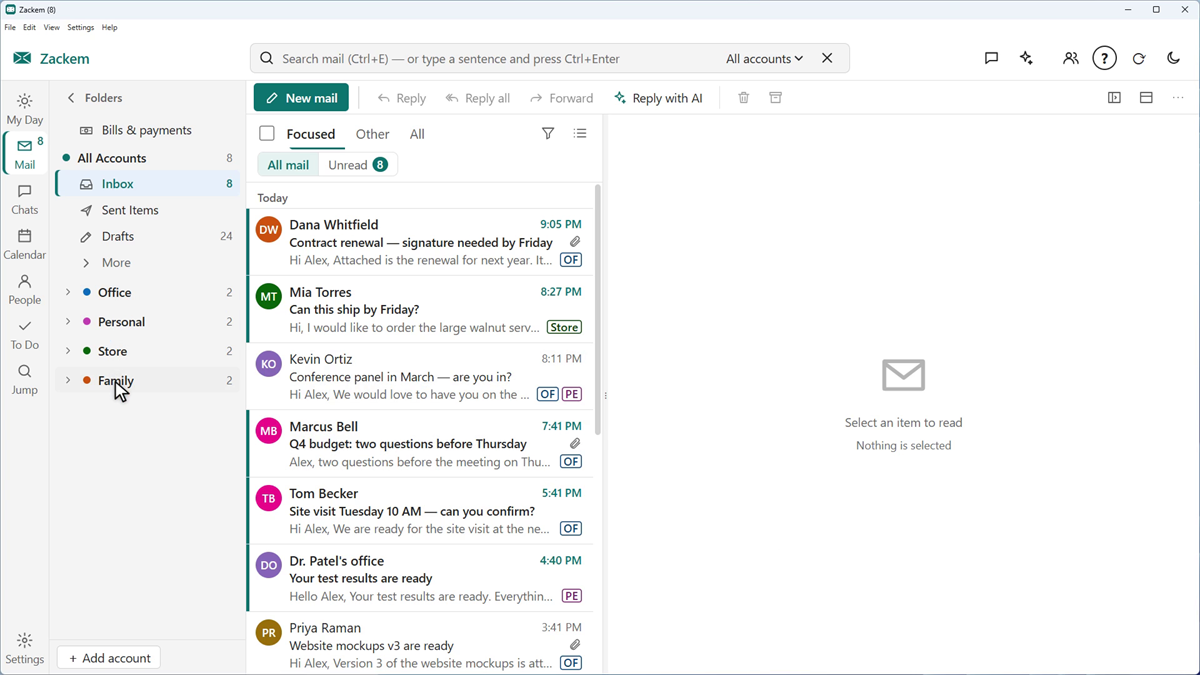
- Your mail shows in one combined inbox, or one account at a time if you prefer. Search finds mail in every account at once, even offline.
Replies go out from the account each email came to, and your mail stays with your provider and on your own computer — Zackem runs no mail servers. More: best email app for multiple accounts.
Method 4: On your phone
- iPhone: Settings → Mail → Accounts → Add Account for each address; the Mail app shows All Inboxes at the top.
- Android: the Gmail app can show other accounts, but each in its own inbox; Samsung Email and other apps have a combined view.
Questions
Can Gmail still show my Yahoo or Outlook emails?
Not by fetching them any more — Google removed Gmailify and POP fetching from other accounts in 2026. You can forward mail from the other account to Gmail, or use an email app that shows all your accounts side by side.
What is a unified inbox?
One inbox list that shows new mail from all your email accounts together, newest first, while each email still belongs to its own account.
Is there a free app to see all my email accounts in one place?
Yes. Thunderbird and Zackem are free with unlimited accounts on the computer, and New Outlook is free with ads. On the iPhone, Apple Mail is free.
Will my replies come from the right address?
In a proper email app, yes: Zackem and Thunderbird reply from the account the email was sent to. With forwarding into Gmail, you must set up "Send mail as" for each address.
Watch: How to set up Zackem: Gmail, Outlook, Yahoo and iCloud in one email app
Related
- How to put a Gmail icon on your desktop
Three ways to put a Gmail icon on your Windows desktop or taskbar: Chrome, Edge, or a free desktop email app. Step by step, about two minutes.
- AI email writer: write and answer emails with AI, right in your inbox
An AI email writer that works inside your desktop inbox: reply with AI, summaries, fix my writing. 50 free tokens, then pay per use – or bring your own ChatGPT, Claude or Gemini.
- Gmail app for Windows: how to get Gmail on your PC or laptop
Google makes no Gmail app for Windows. Here is how to get Gmail on your PC or laptop as a real desktop app, free, with your other email accounts too.