AI email writer: write and answer emails with AI, right in your inbox
An AI email writer drafts an email or a reply for you from a few words: "say yes, but next Tuesday", "decline politely", "ask for the invoice again". Most free AI email writers are websites — you copy the email in, copy the answer out, and paste it back into Gmail or Outlook. Zackem puts the AI email writer inside the email app itself: open the email, click Reply with AI, and the draft appears in the reply box, sent from the right account. You get 50 free tokens to start, and after that you pay only for what you use — no subscription.
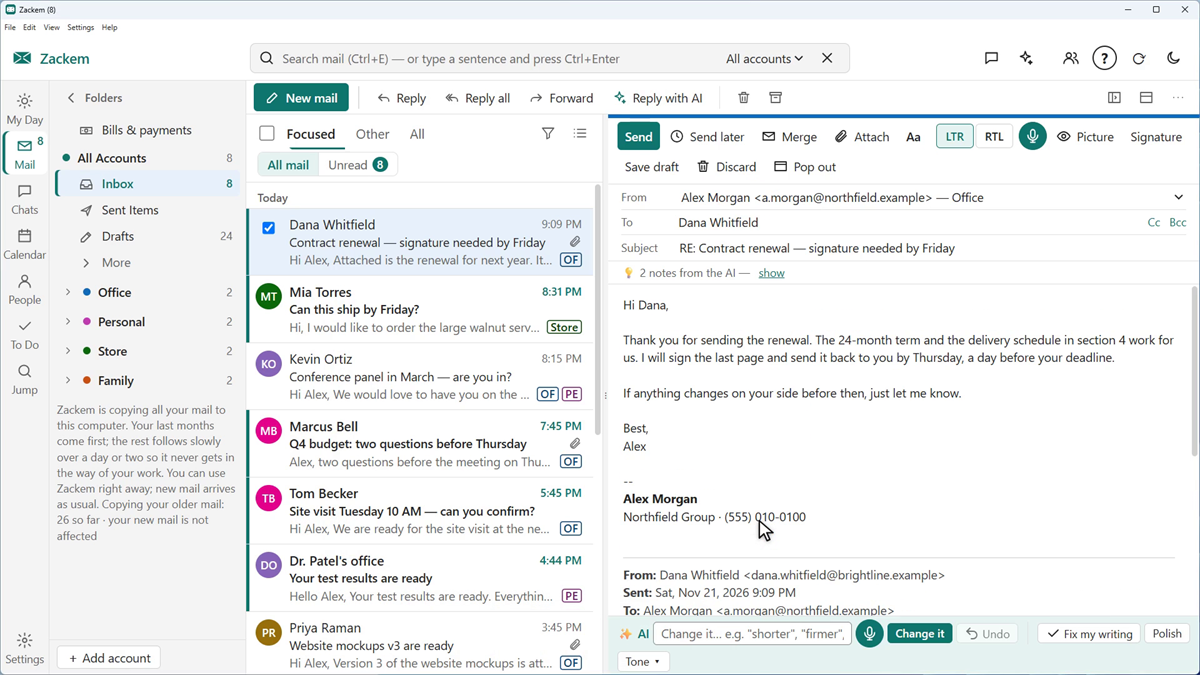
What an AI email writer can do for you
- Reply to an email with AI. It reads the email you are answering, so you only say what you want to say.
- Write a new email from a short instruction.
- Fix my writing. Turns a rushed or non-native draft into clear, polite English, without changing what you mean.
- Summaries of one long conversation, or of many emails at once.
- Translation of an email you received, or of your reply.
- Quick replies and voice dictation for short answers.
Three ways to use an AI email writer
| Way | How it works | Cost | Good for |
|---|---|---|---|
| Free AI email writer websites (QuillBot, Mailmeteor and others) | Paste the email in, copy the draft out | Free with limits | An occasional email |
| AI built into your mail service (Gemini in Gmail, Copilot in Outlook) | Inside one provider's own app | Usually part of a paid Google or Microsoft plan | People who use one provider for everything |
| An email app with AI built in (Zackem, Spark, Canary, eM Client and others) | Works on every account in the app | Varies — see the table below | Several accounts, daily use |
The copy-and-paste websites are fine once in a while. If you answer email every day, having the AI email writer in the same window as the email saves the copying, and it can see the whole conversation you are replying to.
The AI email writer in Zackem
Zackem is a free desktop email app for Windows and Mac (plus iPhone and Android) with unlimited accounts from any provider: Gmail, Microsoft 365, Outlook.com, Yahoo, iCloud, Zoho and any IMAP email. The AI is off until you ask for it. When you do, you choose how it runs:
- Zackem AI tokens. Works the moment you register: every new customer gets 50 free tokens. After that, packs start at $15 for 250 tokens (about 250 AI replies); $30 buys 525 and $60 buys 1,100. Summaries, translation and dictation cost much less than a reply. Tokens are valid for 12 months. No subscription.
- Your own AI account. Already pay for ChatGPT, Claude or Gemini? Connect it and use it in your inbox. You pay the AI company directly, plus the Zackem AI connection at $49 a year.
- On your computer. A free AI model that runs on your own PC or Mac. It works best on a recent computer with 16 GB of memory.
What happens to your email. With Zackem AI, only the email or draft you ask about goes through our server to the AI and straight back. It is not stored and never used for training. Everything else stays where it was: your mail lives with your provider and on your own computer — Zackem runs no mail servers. With the on-your-computer option, nothing leaves your machine.
How to reply to an email with AI in Zackem
- Download Zackem from zackem.ai and add your email accounts (Add account → choose your provider → sign in).
- Open the email you want to answer.
- Click Reply with AI and type what you want to say in a few words, or pick one of the suggested answers.
- Read the draft in the reply box, change anything you like, and send. It goes out from the account the email came to.
AI email writers in email apps: prices compared
| App | AI on the free plan? | Cheapest way to get AI | Billing |
|---|---|---|---|
| Zackem | Yes — 50 free tokens | $15 for 250 tokens, or your own ChatGPT/Claude/Gemini + $49 a year | Pay per use, no subscription |
| Canary Mail | No (AI writing is not on Free) | Growth, $36 a year | Yearly |
| Spark | Limited free preview only | Plus, $99 a year (or $10 a month) | Subscription |
| eM Client | No | Personal, $49.95 a year, includes the AI add-on | Yearly |
| Mailbird | — | "Bring your own" AI, opt-in | See its pricing page |
Spark and Canary are good apps, and if you want a subscription that includes everything, they are worth a look. Zackem's angle: the email app itself is free with unlimited accounts, and you pay for AI only on the days you use it. More detail: best email app for multiple accounts and compare email apps.
Questions
Is there a free AI email writer?
Yes. Websites such as QuillBot and Mailmeteor have free AI email writers with limits. Inside an email app, Zackem gives every new customer 50 free tokens — about 50 AI replies — and you can keep using a free AI model on your own computer after that.
Can AI reply to my emails for me?
It can draft the reply; you decide whether to send it. In Zackem you open the email, click Reply with AI, say in a few words what you want to answer, and check the draft before sending. Nothing is sent without you.
Can I use ChatGPT, Claude or Gemini to write my emails?
Yes. You can copy and paste into their websites, or connect your own ChatGPT, Claude or Gemini account to Zackem so the AI works inside your inbox on every account. The connection costs $49 a year; the AI company bills you for your own usage.
Do I need a subscription for AI email writing?
Not with Zackem. Tokens are bought in packs from $15 and last 12 months. Many other email apps include AI only in a yearly or monthly plan.
Is it safe to let an AI email writer read my email?
Ask what the app sends and where. In Zackem, AI runs only when you ask, only the email or draft you ask about is sent, and it is not stored or used for training. If you prefer nothing to leave your computer, use the on-your-computer AI model.
Can an AI email writer fix my English?
Yes. Write your email the way it comes out, then use "fix my writing". It corrects grammar and tone and keeps your meaning. It is useful for anyone writing in a second language.
Does it work with Gmail, Outlook and Yahoo?
Yes. Zackem's AI works on every account you add — Gmail, Outlook.com, Microsoft 365, Yahoo, iCloud, Zoho and any IMAP email — in one app.
Watch: Zackem: every inbox in one window (free email app for Windows and Mac)
Related
- Gmail app for Windows: how to get Gmail on your PC or laptop
Google makes no Gmail app for Windows. Here is how to get Gmail on your PC or laptop as a real desktop app, free, with your other email accounts too.
- Best email app for multiple accounts (2026)
The free limits and real prices of 9 email apps for several accounts, side by side.
- How to see all your email accounts in one place
Gmail stopped fetching mail from other accounts in 2026. Here are the ways that still work to see Gmail, Outlook, Yahoo and work email in one inbox.
Download Zackem for Windows or Mac See every feature