Gmail app for Windows: how to get Gmail on your PC or laptop
Looking for a Gmail app for Windows? Google does not make one. There is no official Gmail download for PC or laptop, not for Windows 10 and not for Windows 11 — Gmail on a computer is officially a website. You still have good choices: a browser shortcut that behaves like an app, the mail program that comes with Windows, or a free desktop email app such as Zackem that runs Gmail and every other account you have in one window.
Is there an official Gmail app for PC?
No. Google makes Gmail apps for iPhone and Android only. Anything in a search result called "Gmail download for PC" is either a shortcut to the Gmail website or a third-party email program that connects to your Gmail account. That is fine — Gmail is built to work with other mail programs — but it is good to know what you are installing.
Three ways to get Gmail on Windows
| Option | What it is | Cost | Good for |
|---|---|---|---|
| Gmail website as an app (Chrome or Edge) | The Gmail website in its own window with a taskbar icon | Free | One Gmail account, always online |
| New Outlook for Windows | Microsoft's mail app that replaced Windows Mail | Free with ads; Microsoft 365 removes them | People who already live in Microsoft 365 |
| A desktop email app (Zackem, Thunderbird, eM Client, Mailbird and others) | A real program that downloads your mail to your PC | Zackem and Thunderbird are free with unlimited accounts; others vary (see below) | Several accounts, offline reading, one inbox |
1. Install the Gmail website as an app
In Chrome, open Gmail, click the three-dot menu, then Cast, save and share → Install page as app. In Edge, open Gmail, click the three-dot menu, then Apps → Install this site as an app. You get a Gmail icon on the taskbar and Start menu. It is still the website: no offline search, and each extra Gmail account needs its own window or a profile switch. Step by step: how to put a Gmail icon on your desktop.
2. New Outlook
Windows 11 now ships New Outlook in place of the old Mail app. It can add a Gmail account. Note one thing before you do: when you add a Gmail or other non-Microsoft account, New Outlook syncs it through Microsoft's cloud, so a copy of your Gmail passes through Microsoft's servers. Microsoft explains this on its own support pages. For some people that is fine; for others it is the reason they look elsewhere.
3. A free desktop email app
A desktop email program connects straight from your computer to Gmail. Your mail is stored on your own PC, so it opens instantly and you can search it with no internet. This is the closest thing to "the Gmail app for Windows" that people are searching for.
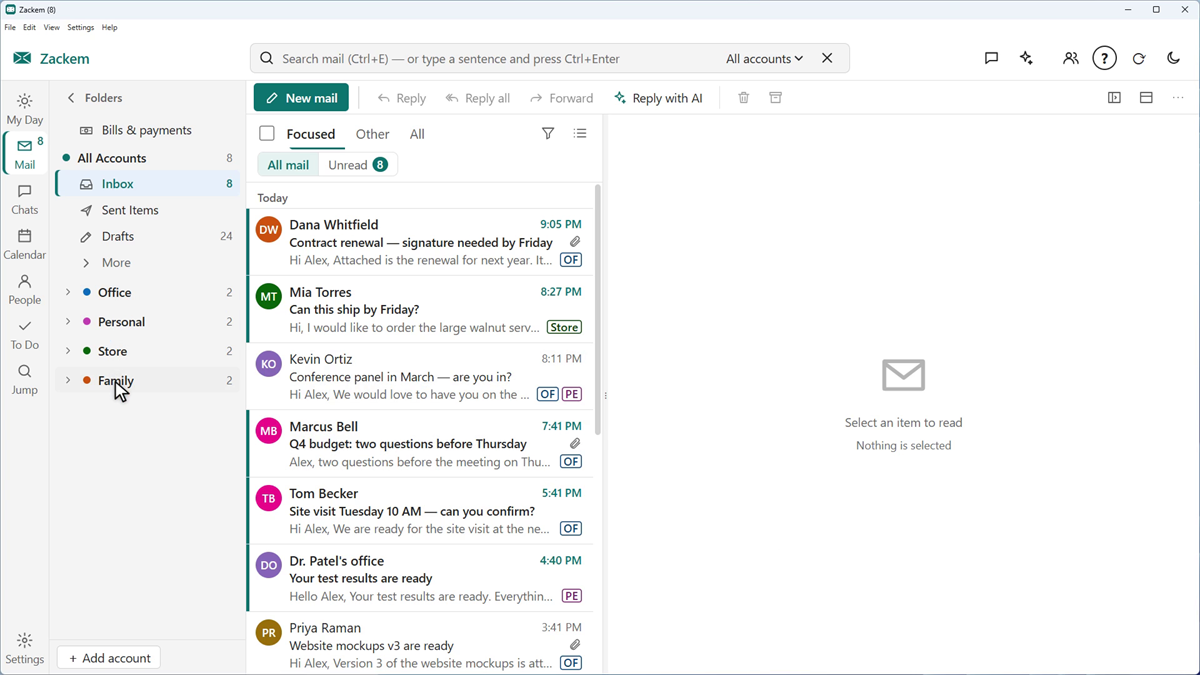
Gmail on Windows with Zackem
Zackem is a free email app for Windows (and Mac, iPhone and Android) made by Emaili LLC.
- Gmail sign-in with Google's own window. No app passwords and no settings to type: click Add account, choose Google, sign in.
- Every account in one place. Add as many Gmail accounts as you like, plus Outlook.com, Microsoft 365, Yahoo, iCloud, Zoho and any IMAP email — unlimited, free. See them one by one or all together.
- Your mail stays with Google and on your computer. Zackem runs no mail servers and never sees your messages.
- Search that works offline, across every account at once.
- Replies go out from the right address. Mail that came to your work Gmail is answered from your work Gmail.
- Focused and Other, and one-click unsubscribe, to keep newsletters out of the way.
- AI only when you ask: reply with AI, summaries, "fix my English" and plain-language search. Use your own Claude, ChatGPT or Gemini account ($49 a year AI connection) or Zackem AI tokens from $15 for 250 tokens. Every new customer gets 50 free tokens. No subscription is needed for the core app.
How to download Gmail for your laptop or PC with Zackem
- Download Zackem for Windows from zackem.ai (Windows 10 and 11, 64-bit).
- Open the installer and follow the steps — it takes about a minute.
- Click Add account → Google, and sign in to Gmail in Google's window.
- Your Gmail appears. Add your other Gmail accounts, or Yahoo, Outlook.com and work email, the same way.
How Zackem compares with other Gmail apps for Windows
| App | Free plan | Paid plan | Accounts on the free plan |
|---|---|---|---|
| Zackem | Free, no time limit | Optional AI and modules | Unlimited |
| Thunderbird | Free (open source) | — | Unlimited |
| eM Client | Free for home use, 1 device | $49.95 a year (Personal) | 2 |
| Mailbird | Free version | $4 per user a month, yearly; or $99.75 one time | Not stated on its pricing page |
| Canary Mail | Free forever, up to 2 devices | $36 a year (Growth), $100 a year (Pro+) | Unlimited |
Thunderbird is a strong free choice if you like to adjust settings yourself. eM Client is polished but its free plan stops at two accounts. Canary Mail has a free plan on Windows too. Zackem's angle: unlimited accounts free, mail kept on your computer, and AI that you pay for only when you use it. More side-by-side detail: best email app for multiple accounts and compare email apps.
Questions
Is there a Gmail app for Windows 10 or Windows 11?
No. Google makes Gmail apps only for iPhone and Android. On Windows you can install the Gmail website as an app from Chrome or Edge, use New Outlook, or use a free desktop email app such as Zackem or Thunderbird.
How do I download Gmail on my laptop?
Since Google has no Gmail download for laptops, download a desktop email app instead. With Zackem: download it from zackem.ai, install it, click Add account, choose Google and sign in. Your Gmail appears in about a minute.
Is the Gmail app for PC free?
The Gmail website shortcut is free, and so is Zackem, with unlimited Gmail and other accounts and no time limit. Some other email programs charge for more than one or two accounts.
Can I use more than one Gmail account on my PC?
Yes. In Zackem you add each Gmail account once and see them side by side or in one combined inbox. In the browser you have to switch accounts or open separate windows.
Can I read my Gmail offline on Windows?
Not in the browser. A desktop email app such as Zackem keeps a copy of your mail on your PC, so you can read and search it with no internet. New messages are sent when you are back online.
Does Zackem store my Gmail on its servers?
No. Zackem connects directly from your computer to Google. Your mail stays with Google and on your own computer; Zackem runs no mail servers.
How do I put a Gmail icon on my desktop?
In Chrome or Edge, install Gmail as an app from the browser menu, then right-click its Start menu entry and pin it. Our step-by-step guide shows each click. If you use Zackem, the installer adds its own desktop icon.
Watch: How to set up Zackem: Gmail, Outlook, Yahoo and iCloud in one email app
Related
- AI email writer: write and answer emails with AI, right in your inbox
An AI email writer that works inside your desktop inbox: reply with AI, summaries, fix my writing. 50 free tokens, then pay per use – or bring your own ChatGPT, Claude or Gemini.
- Best email app for multiple accounts (2026)
The free limits and real prices of 9 email apps for several accounts, side by side.
- How to see all your email accounts in one place
Gmail stopped fetching mail from other accounts in 2026. Here are the ways that still work to see Gmail, Outlook, Yahoo and work email in one inbox.