Best email app for multiple accounts (2026)
If you have a Gmail, a work address and one or two more, you want them all in one window without paying per account. Here is what each well-known email app gives you free, what it costs after that, and where your mail actually goes.
The short answer
- Free with unlimited accounts: Zackem, Canary Mail, Spark, BlueMail and Thunderbird.
- Limited free versions: eM Client allows 2 accounts free; Mailbird allows 1.
- Mail kept only on your own computer: Zackem and Thunderbird. Spark and Canary Mail process mail through their own servers for some features.
- AI with no subscription: Zackem is the only one here that sells AI by the token, from $15, with 50 free tokens to start.
Side by side
| App | Free version | Paid from | Top price | Where your mail is processed | Windows | Mac | iPhone | Android |
|---|---|---|---|---|---|---|---|---|
| Zackem | Unlimited accounts | AI $49/yr, or tokens from $15 | $149/yr (all modules) | Your computer only | ✔ | ✔ | ✔ | ✔ |
| Canary Mail | Unlimited accounts, 2 devices | $36/yr | $100/yr | Canary's servers for some features | ✔ | ✔ | ✔ | ✔ |
| Spark | Unlimited accounts | $99/yr | $199/yr | Spark's servers | ✔ | ✔ | ✔ | ✔ |
| eM Client | 2 accounts, home use | $49.95/yr | $89.95 one-time per device | Your computer | ✔ | ✔ | free app | free app |
| Mailbird | 1 account | $69/yr | $99.75 one-time | Your computer | ✔ | ✔ | beta | beta |
| Thunderbird | Unlimited, free | — | — | Your computer | ✔ | ✔ | — | ✔ |
| Outlook | Free, with ads | $1.99/mo removes ads | Microsoft 365 | Microsoft's cloud for Gmail, Yahoo and IMAP | ✔ | ✔ | ✔ | ✔ |
| BlueMail | Unlimited | $49/yr | $49/yr | BlueMail's servers for push | ✔ | ✔ | ✔ | ✔ |
| Mailspring | Several accounts | about $8/mo | about $8/mo | Your computer (Pro features use its servers) | ✔ | ✔ | — | — |
The apps, one by one
1. Zackem — free, unlimited accounts, mail stays on your computer
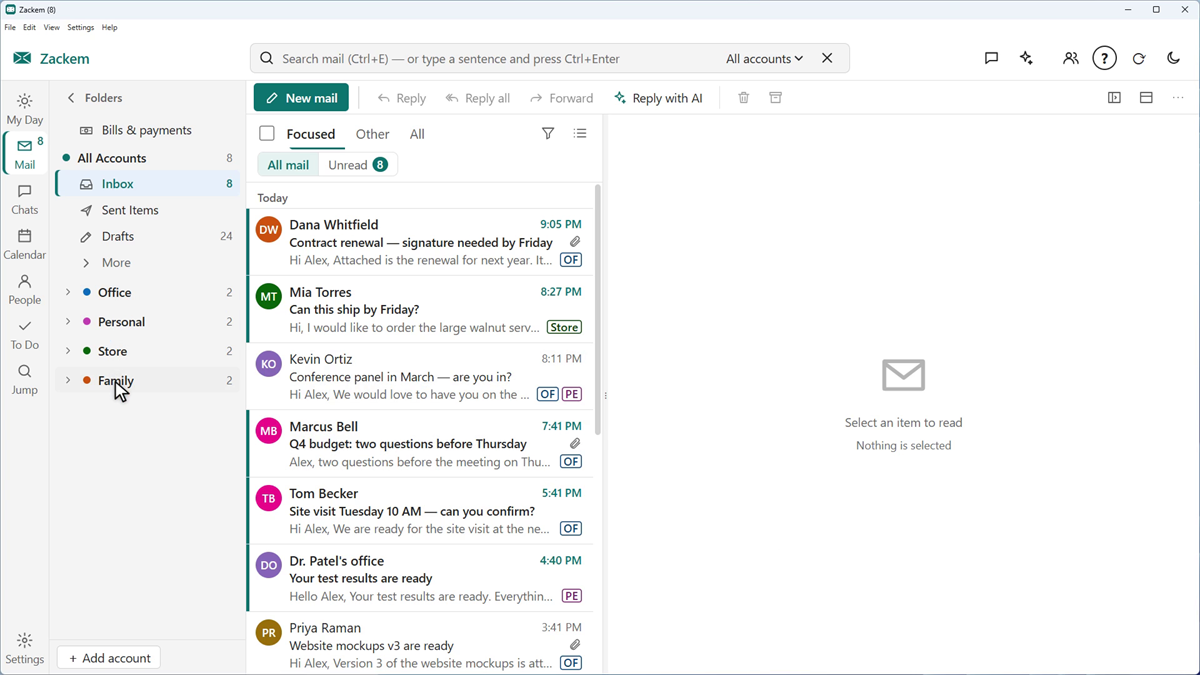
Zackem is a desktop email program for Windows and Mac, with iPhone and Android apps. It puts Gmail, Microsoft 365, Outlook.com, Yahoo, iCloud, Zoho and any IMAP account in one window — each on its own or all together, duplicates shown once, replies sent from the account the mail came to. Search works offline across every account. Focused and Other keep advertising out of the way; unsubscribe is one click. AI is there only when you ask: reply with AI, summaries, fix my English, plain-language search. Bring your own Claude, ChatGPT or Gemini account ($49/yr connection), or use Zackem AI tokens from $15 — no subscription.
Good for: anyone with several mailboxes who wants them free, on their own computer. Not for: offices that live inside Microsoft 365 shared mailboxes and Teams.
2. Canary Mail — cheapest paid AI
Unlimited accounts free on up to 2 devices; Growth at $36/yr adds its AI assistant; Pro+ at $100/yr adds encryption features. Available on every platform.
Good for: people who want AI on a budget and don't mind a cloud service.
3. Spark — polished, team-oriented
Unlimited accounts free. Plus $99/yr, Pro $199/yr, with an AI quota each month. Mail is synced through Spark's servers.
Good for: teams sharing threads. Cost: the most expensive here once you pay.
4. eM Client — strong desktop client, paid for more than 2 accounts
Free for 2 accounts at home. Personal $49.95/yr (AI add-on included) or $74.95 one-time; business licences per device.
Good for: people who prefer a one-time licence.
5. Mailbird — Windows-first, 1 account free
Free for one account only. Premium $69/yr or $99.75 one-time. Phone apps in beta.
6. Thunderbird — free and open source
Free, unlimited, from Mozilla. No AI built in; the look is dated, but it is honest software.
7. Outlook (new) — free with ads
Free with ads; Microsoft 365 removes them. Gmail, Yahoo and IMAP accounts added to New Outlook are fetched and synced through Microsoft's cloud. See Zackem vs New Outlook.
8. BlueMail — every platform
Unlimited accounts; Plus about $49/yr. Push notifications go through its servers.
9. Mailspring — simple and fast
Free for several accounts; Pro about $8 a month for read receipts and reminders.
How to choose
- You want free, unlimited and private: Zackem or Thunderbird. Zackem if you also want a modern look, phone apps and optional AI.
- You want the cheapest AI subscription: Canary Mail.
- You never want a subscription: Zackem (AI by the token) or eM Client / Mailbird one-time licences.
- Your office runs on Microsoft 365: Outlook.
Questions
What is the best free email app for multiple accounts?
Zackem, Canary Mail, Spark, BlueMail and Thunderbird all allow unlimited accounts free. Of those, Zackem and Thunderbird keep your mail only on your own computer.
Is there an email app that combines Gmail, Outlook and Yahoo in one inbox?
Yes. Zackem shows every account in one list or each on its own, and replies from the account the email came to.
Which email app is cheapest for several accounts?
Free: Zackem, Thunderbird, Canary, Spark, BlueMail. Paid AI: Canary at $36/yr is the lowest subscription; Zackem tokens start at $15 with no subscription.
Do I have to pay per account?
Not with Zackem — there is no account limit, free.
Watch: Zackem complete tour: the free email app for multiple accounts
Related
- Zackem vs New Outlook (2026)
What New Outlook sends to Microsoft, what stays on your PC, and where each one is better.
- Email server settings lookup
IMAP and SMTP settings for Gmail, Outlook, Yahoo, iCloud and more.
Download Zackem for Windows or Mac See every feature